Architecture
The relay translates SMTP into Microsoft Graph calls, handling OAuth transparently. It is stateless (no persisted session data), lightweight, and enforces TLS.
Components
| Component | Responsibility | Code |
|---|---|---|
| SMTP server (aiosmtpd) | Listen on 8025, handle SMTP commands, enforce STARTTLS |
src/custom.py |
| Authenticator | Parse username (UUID/base64url/lookup), obtain OAuth token | Authenticator in src/main.py |
| Handler | Parse the message, apply From override, POST to Graph sendMail |
Handler in src/main.py |
| SSL context | Load TLS certificates from file or Key Vault | src/sslContext.py |
| Config loader | Read and validate environment variables | src/env.py |
CustomSMTP/CustomController work around an aiosmtpd issue with lowercase AUTH commands.
Authentication and send flow
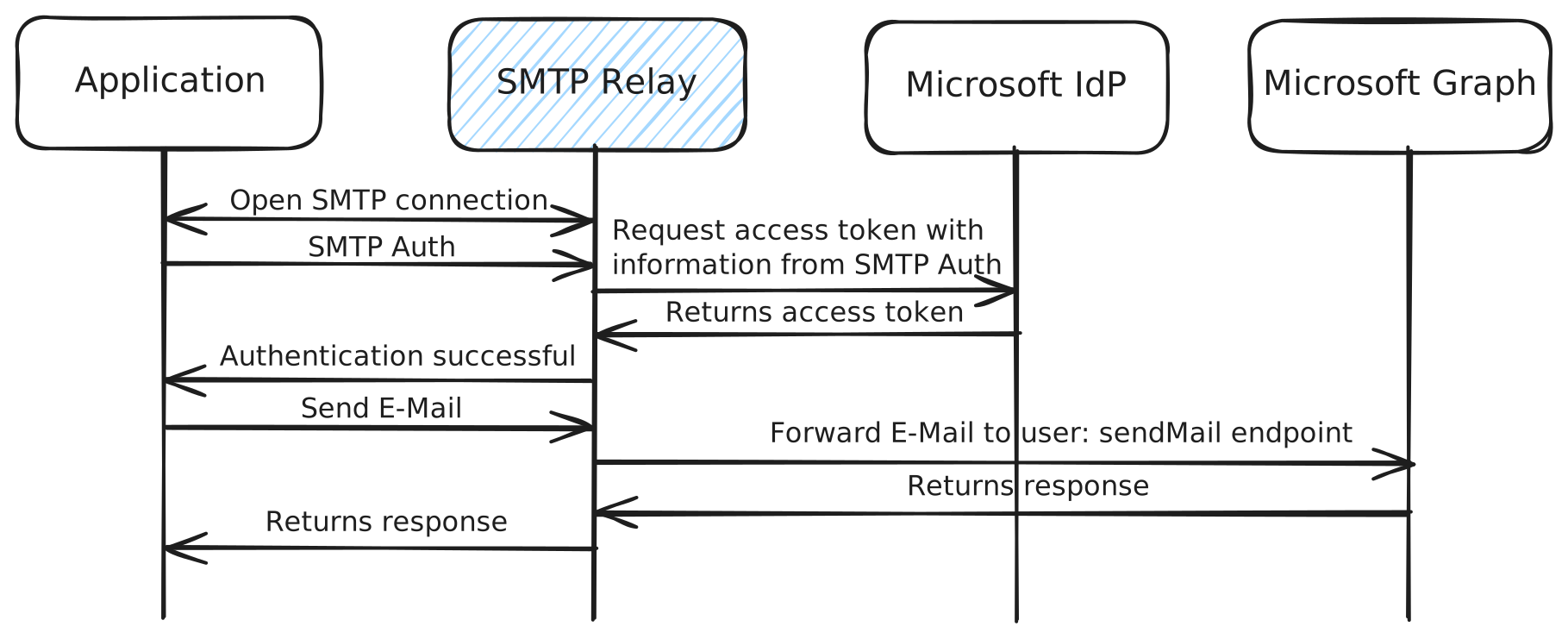
- Connect → EHLO — server advertises STARTTLS and AUTH.
- STARTTLS — TLS negotiated when
REQUIRE_TLS=true. - AUTH —
LOGINorPLAIN; the username is parsed intotenant_id/client_id(base64url decoded, or resolved via Azure Tables forid@lookup). - Token — requested from
https://login.microsoftonline.com/{tenant}/oauth2/v2.0/token; on success the relay returns235and stores the token on the session. - MAIL/RCPT/DATA — the message is read, the From address overridden if the table specifies one, and the MIME message base64-encoded.
- Graph —
POST /v1.0/users/{from}/sendMailwithAuthorization: Bearer ….202 Accepted→250 OKto the client; errors →554 Transaction failed.
POST https://graph.microsoft.com/v1.0/users/sender@example.com/sendMail
Authorization: Bearer eyJ0eXAiOiJKV1Qi...
Content-Type: text/plain

<base64-encoded MIME message>
Design notes
- Async I/O — built on
asyncio, so a single instance handles many concurrent connections. - Per-connection token — a token is requested per authentication (no caching); this keeps the relay stateless and easy to scale horizontally.
- Layered error handling — config errors fail at startup; auth and Graph errors map to SMTP status codes; failures are logged at the configured
LOG_LEVEL.