Authentication
How the relay maps SMTP credentials to an OAuth token.
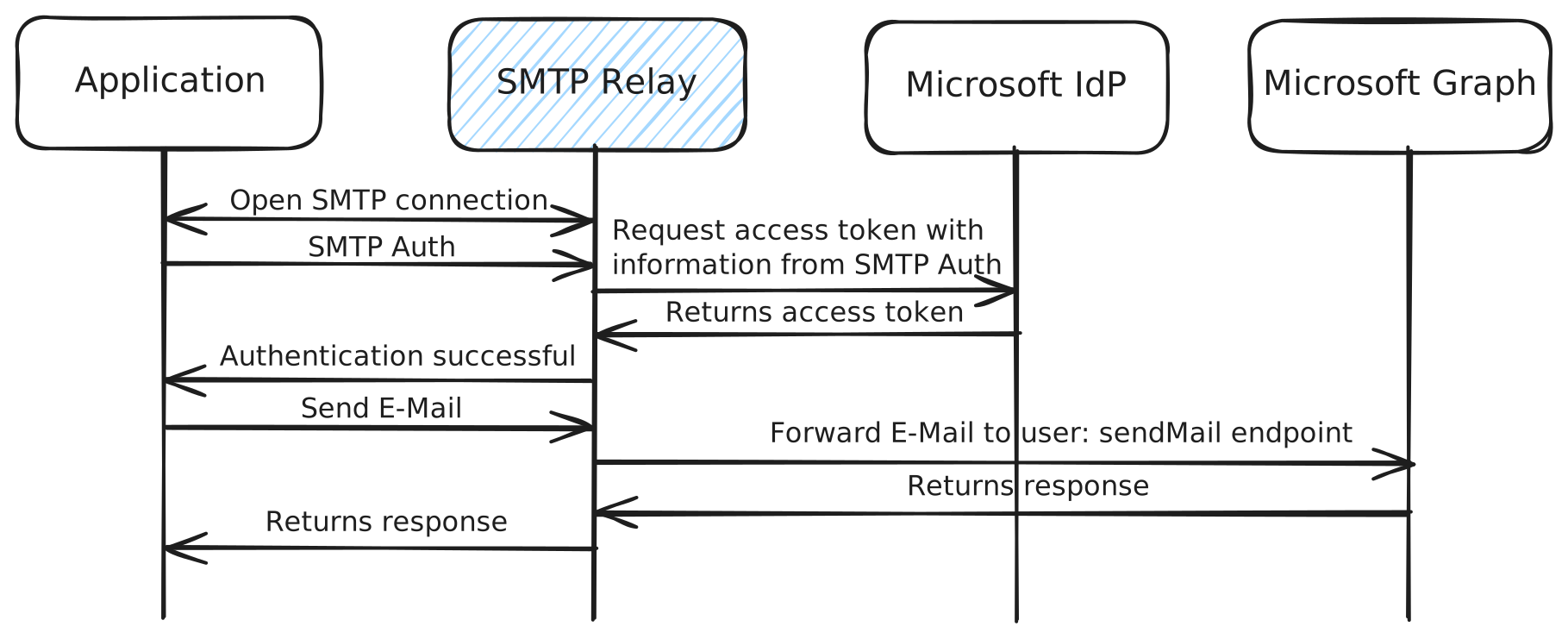
Flow
- Client connects and issues
STARTTLS(required whenREQUIRE_TLS=true). - Client sends
AUTH LOGINorAUTH PLAIN. - The relay parses the username into
tenant_idandclient_id. - The relay requests an OAuth token from Microsoft Entra ID using the client secret (the SMTP password).
- On success it accepts the message and forwards it via Microsoft Graph
sendMail.
Username format
- delimiter —
@by default (USERNAME_DELIMITER); also:or|. - password — always the application client secret.
- optional TLD — anything after the first
.is ignored, soclient_id.localworks for clients that demand an@domain.tldusername.
# Standard UUIDs
12345678-1234-1234-1234-123456789abc@abcdefab-1234-5678-abcd-abcdefabcdef

# With a .local suffix for picky clients
12345678-1234-1234-1234-123456789abc@abcdefab-1234-5678-abcd-abcdefabcdef.local
UUID encoding
The relay accepts each ID as either a standard hyphenated UUID (36 chars) or a Base64URL-encoded form (22 chars, no padding) for clients with short username fields. Decoding is automatic — no configuration needed.
Azure Tables lookup
For devices with username length limits or no custom From address, store credentials in Azure Tables and authenticate with a short ID:
The relay detects @lookup, queries the table for RowKey=app1, and uses the stored tenant_id/client_id. See Azure Tables Integration.
Supported AUTH mechanisms
| Mechanism | Supported | Notes |
|---|---|---|
AUTH LOGIN |
Username/password requested separately | |
AUTH PLAIN |
Base64 \0user\0pass |
|
CRAM-MD5 / DIGEST-MD5 |
Require a shared secret | |
XOAUTH2 |
Not needed — the relay handles OAuth internally |
TLS first
With REQUIRE_TLS=true, authentication before STARTTLS is rejected with 530 5.7.0 Must issue a STARTTLS command first.
Test authentication
Troubleshooting
| Error | Cause | Fix |
|---|---|---|
Invalid username format |
Missing/duplicate delimiter | Match USERNAME_DELIMITER; format tenant_id@client_id |
AADSTS700016: Application not found |
Wrong tenant/client ID or no service principal | Verify IDs; ensure the service principal exists |
AADSTS7000215: Invalid client secret |
Wrong or expired secret | Recreate the client secret |
Must issue a STARTTLS command first |
REQUIRE_TLS=true, no TLS |
Enable STARTTLS on the client |
| Base64URL decode fails | Bad encoding | Use urlsafe_b64encode, strip = padding |